HP Envy 5000 Series - A 'System Extension Blocked' Message Displays (macOS)
HP Envy 5000 Series - A 'System Extension Blocked' Message Displays (macOS)
This document is for HP printers and macOS Mojave (10.14) and Catalina
(10.15).
When installing an HP print driver, a System Extension
Blocked error message displays during driver installation.

Use Apple's Security and Privacy System Preferences to allow the required
extensions to install for your printer to work correctly.
-
Open the Security & Privacy preferences.
-
If the error message displays, click Open Security Preferences.

-
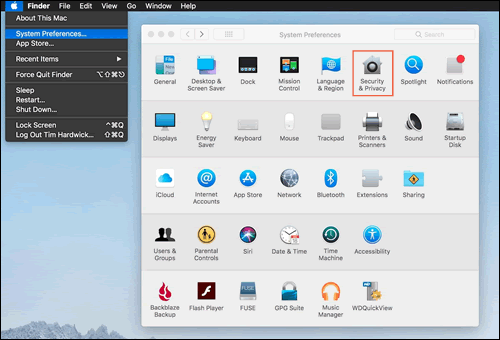
If the error message does not display, open the Apple menu, select System Preferences, and then click Security & Privacy.
-
-
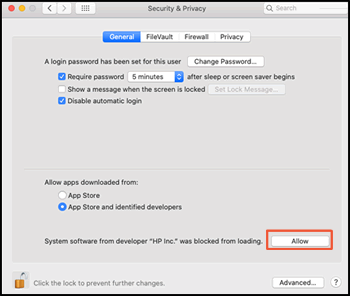
On the General tab, click Allow next to the HP Inc. was blocked from loading message.
-
If a Legacy System Extension message displays, click OK.

-
Restart the computer to finish the installation.
https://support.hp.com/

Comments
Post a Comment